Website Backup & Disaster Recovery for UAE Businesses (2026)
Most UAE businesses discover they have no reliable website backup the moment they need one most after a hack, a botched update, or a hosting failure. A backup you have not tested is not a backup; it is a false sense of security. Here is the practical backup and recovery setup every UAE business website needs.
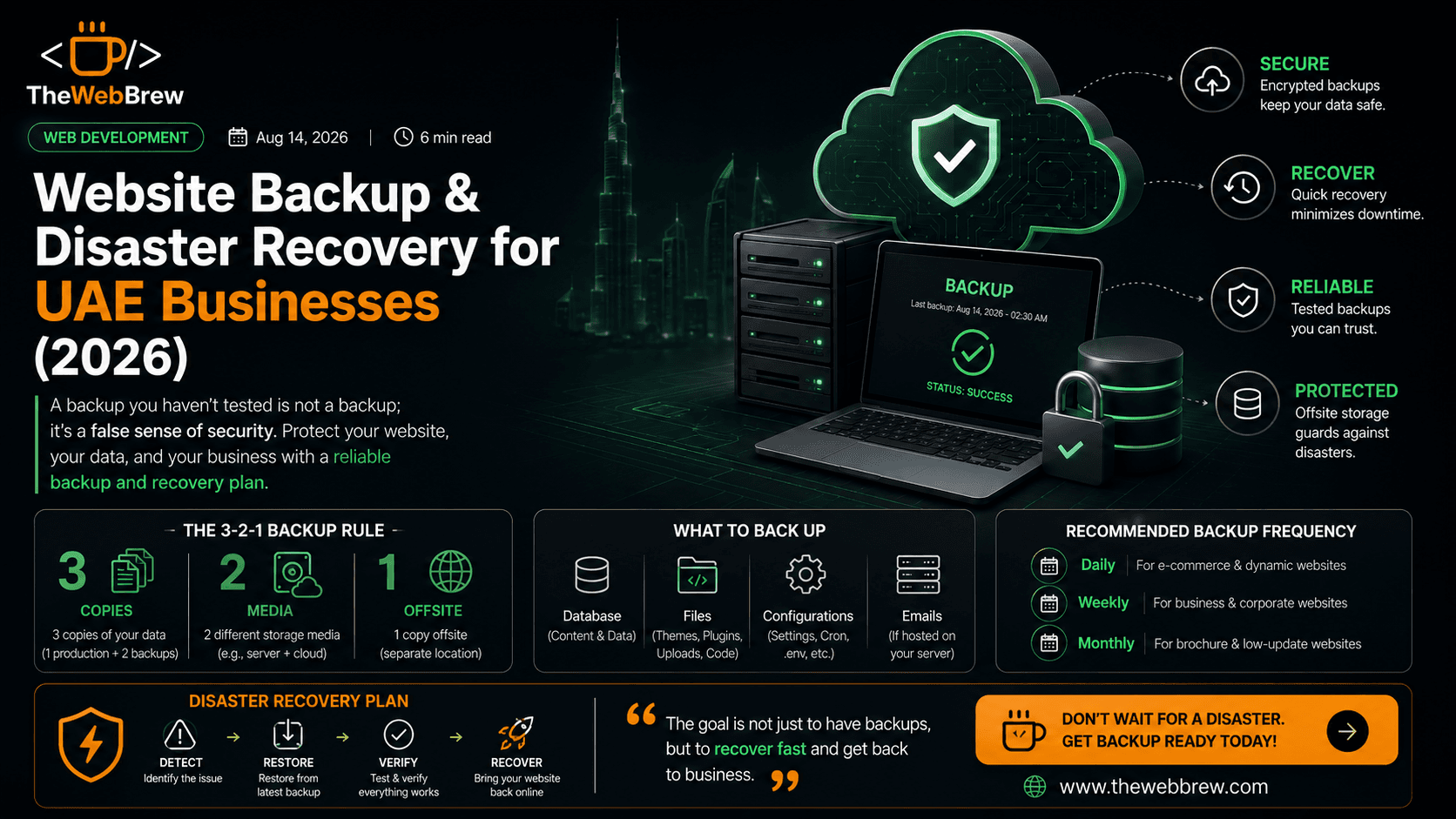
The 3-2-1 backup rule for UAE websites
The 3-2-1 rule applies as well to websites as to any digital asset: 3 copies of your data (production + 2 backups), 2 different storage media (e.g., server filesystem + cloud storage), 1 offsite copy (storage physically separate from your server). For UAE websites in practice: your hosting provider's backup counts as one copy on one medium; an automated backup to S3, Google Cloud Storage, or BackBlaze B2 is your second copy on different infrastructure; a periodic local copy (monthly) on an external drive or your NAS gives you the offsite third. Most UAE businesses running shared hosting have only the first copy the hosting provider's backup which means a single point of failure.
Backup frequency by website type
Static brochure websites (no CMS, rarely updated): weekly backup is sufficient. WordPress or CMS-managed websites with regular content updates: daily backups minimum. E-commerce websites with daily orders and inventory changes: real-time or hourly database backups for order data, daily full-site backups. Custom web applications with user data: database transaction logs enabling point-in-time recovery, daily full application backups. For UAE e-commerce specifically: losing orders between the last backup and a recovery event has direct revenue and customer relationship consequences. The backup frequency investment should scale with the cost of data loss.
Backup solutions for UAE WordPress websites
UpdraftPlus (free tier): backs up to Google Drive, Dropbox, S3; weekly backups by default, configurable. Excellent starting point for UAE SME WordPress sites. UpdraftPlus Premium: adds incremental backups, more storage destinations, multisite support. WP Time Capsule: continuous incremental backups, 1-click restore ideal for UAE e-commerce WordPress. Jetpack Backup (Real-Time): real-time backups with 30-day history, 1-click restore excellent for high-traffic UAE sites. ManageWP: central management of multiple WordPress sites including backup good for UAE agencies managing multiple client sites. Recommendation: whatever you use, configure backups to go to an external cloud destination (not just your hosting server's local storage) and verify the backup works by testing a restore at least quarterly.
Recovery time objectives for UAE businesses
Before a crisis, answer: how long can my website be down before it significantly impacts my business? This is your Recovery Time Objective (RTO). For UAE e-commerce: RTO is often 1–2 hours (revenue impact is immediate). For UAE professional service businesses: RTO might be 24 hours (clients contact by phone if the website is down). For UAE SaaS or applications: RTO may be minutes (users depend on the application). Your backup setup, hosting choice, and recovery documentation should match your RTO. A website with a 1-hour RTO needs: tested restores (not just backups), a staging environment to restore into before going live, documented recovery steps (so anyone on your team can execute them), and a communication plan (what to tell customers while the site is down).
What to do when your UAE website goes down
Immediate steps when your website goes down: (1) Identify the scope is it your domain, your hosting, your application, or a global CDN issue? Check your domain registrar, hosting control panel, and a tool like isitdownrightnow.com. (2) Contact your hosting provider most UAE hosting providers and Vercel/AWS have status pages; check before calling support. (3) If it is a hacked website, do not restore immediately contact your hosting provider or a security professional first; restoring a hacked site without removing the malware just restores the problem. (4) Execute your recovery plan restore from your most recent clean backup to staging, verify the restore, then push to production. (5) Post-incident: document what happened, update your backup frequency if the incident revealed a gap, and consider a monitoring service (UptimeRobot, Better Uptime) that alerts you immediately when the website goes down rather than waiting for a customer to tell you.
Related reading
Protect your UAE website with reliable backups
TheWebBrew sets up and manages automated backup systems for UAE business websites daily offsite backups, tested restores, and documented recovery procedures.
Get Website Backup Setup