How to Launch an Online Store in the UAE: Step-by-Step (2026)
UAE e-commerce has specific requirements that don't apply in most other markets business licencing, Arabic RTL support, local payment gateways, and VAT compliance. This guide covers every step from business registration to your first sale, in the right order.
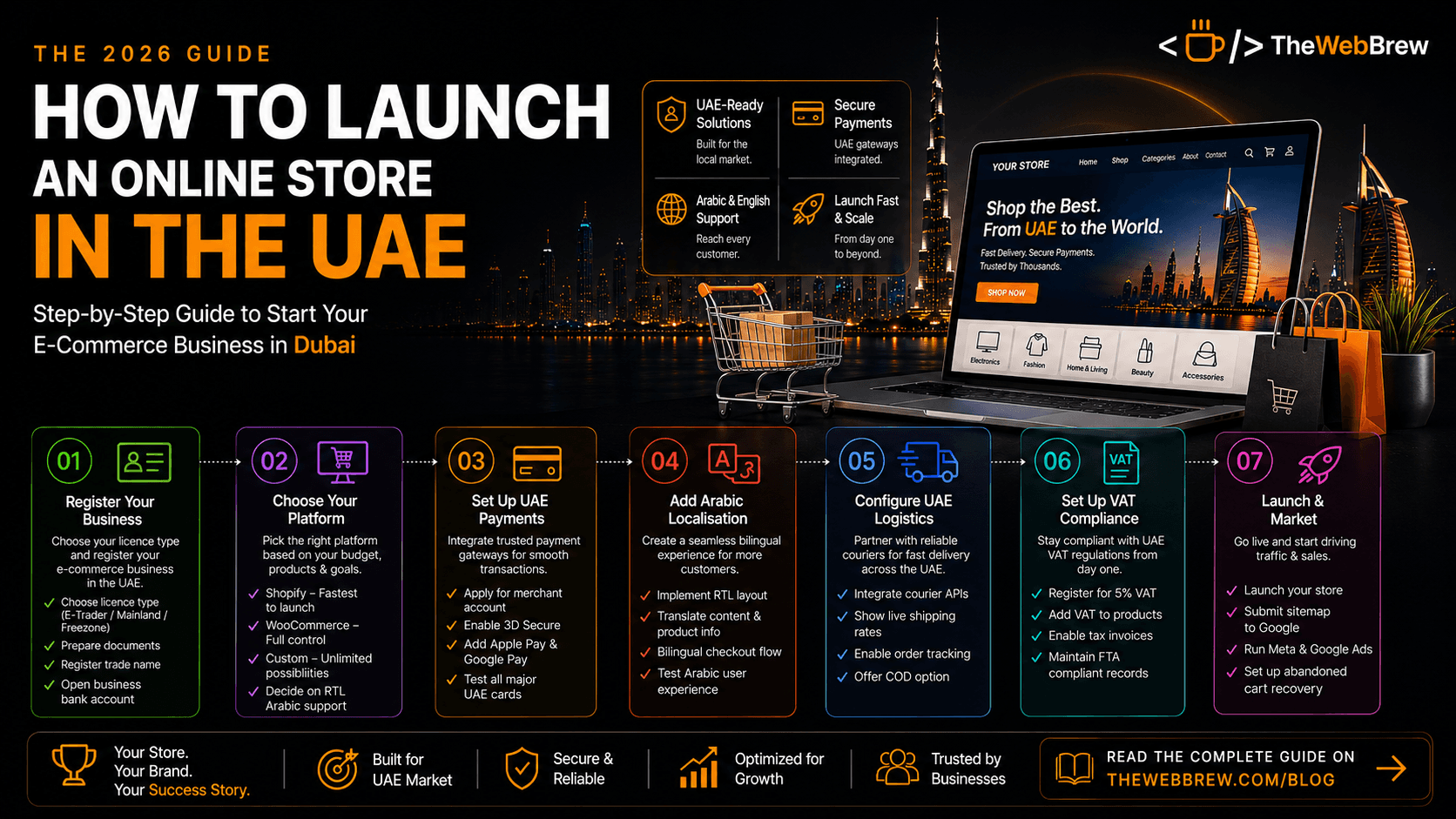
Register your UAE e-commerce business
Before you sell anything in the UAE, you need the right business licence. Options include: a DED E-Trader Licence (cheapest, for UAE nationals and residents selling from home from AED 1,070/year), a Mainland Commercial Licence (for physical operations, required if you have a warehouse or staff), or a Freezone E-Commerce Licence (popular options: SHAMS, IFZA, Meydan from AED 7,500/year). Most small UAE e-commerce businesses start with a freezone licence.
Choose your e-commerce platform
Shopify is the fastest path to launch you can be live in 1–2 weeks with a properly configured store. WooCommerce suits businesses already on WordPress or needing deeper customisation. For large catalogues, complex B2B pricing, or a fully bespoke experience, a custom build on Next.js or a headless Shopify setup gives you full control.
Configure UAE payment gateways
UAE payment gateway setup is non-negotiable and often where launches get delayed. The main options: PayTabs (most widely used in the Gulf, easy API), Telr (strong UAE bank support), Checkout.com (best for scale), and Network International (bank-owned, enterprise). You must enable 3D Secure authentication required by UAE issuing banks. Also add Apple Pay and Google Pay UAE adoption is among the highest globally.
Add Arabic localisation
68% of UAE online shoppers prefer to browse and checkout in Arabic. This is not a nice-to-have it directly affects your conversion rate with a large portion of the market. Arabic localisation means more than translating text: you need a proper RTL layout (everything flips), Arabic typography that renders correctly, and bilingual product names and descriptions.
Set up UAE logistics integration
UAE customers expect same-day or next-day delivery in Dubai. Integrate with a UAE logistics provider at the API level so customers see real-time shipping rates at checkout and receive automated tracking updates. Main options: Aramex (widest GCC coverage), Fetchr (strong UAE same-day), Quiqup (on-demand Dubai), or a third-party logistics warehouse if you have high volume.
Configure VAT compliance
UAE VAT at 5% applies to most goods sold online. Your store must automatically calculate VAT, display it clearly at checkout, generate VAT-compliant tax invoices (with your TRN number), and maintain records for FTA submissions. Shopify handles VAT calculations natively. WooCommerce needs the correct tax configuration. If you're below the AED 375,000 annual revenue threshold, VAT registration is optional.
Pre-launch checklist and go-live
Before you go live, test every critical path: a full purchase flow in both English and Arabic, payment via different UAE-issued cards, mobile checkout on iOS and Android, and order confirmation emails. Set up Google Analytics 4 and Meta Pixel before launch so you have data from day one. Submit your sitemap to Google Search Console the day you launch.
Frequently asked questions
What type of business licence do I need to sell online in the UAE?
The right licence depends on your scale and residency status. A DED E-Trader Licence is the cheapest entry point (from AED 1,070/year) and suits UAE nationals and residents selling from home without a physical storefront or warehouse. A Mainland Commercial Licence is required if you need physical operations a warehouse, retail counter, or on-payroll staff working from a UAE office. Most small to mid-sized UAE e-commerce businesses instead choose a Freezone E-Commerce Licence through providers like SHAMS, IFZA, or Meydan, starting around AED 7,500/year, which offers 100% foreign ownership and a straightforward setup process without requiring physical premises. Whichever route you choose, you'll need passport and Emirates ID copies, a registered trade name, and a UAE business bank account before you can accept payments legally. Get this step right first switching licence types after you've built a customer base and integrated payment gateways creates unnecessary delays and compliance headaches.
Do I need to register for VAT before launching my UAE online store?
Not necessarily at launch. UAE VAT registration becomes mandatory once your taxable turnover exceeds AED 375,000 in a 12-month period; below that threshold, registration is optional, though there's a voluntary registration option above AED 187,500 if you want to reclaim input VAT early. Once registered, your store must automatically calculate 5% VAT on applicable products, display it clearly at checkout rather than as a surprise add-on, generate FTA-compliant tax invoices that include your TRN number, and maintain proper records for periodic filing. Shopify handles VAT calculation natively once configured; WooCommerce requires manually setting up the correct tax rules. Many new UAE store owners underestimate this step and scramble to retrofit VAT compliance after crossing the threshold building it into your platform configuration from day one, even before you're legally required to register, saves a painful mid-growth fire drill later.
Which payment gateway should I use for a UAE e-commerce store?
PayTabs and Telr are the most widely used gateways for UAE and wider Gulf e-commerce, both offering solid local bank support and straightforward API integration for Shopify and WooCommerce. Checkout.com is the stronger choice if you're planning to scale internationally, and Network International suits larger, bank-backed enterprise setups. Whichever you choose, two things are non-negotiable for the UAE market: enabling 3D Secure authentication, which UAE issuing banks require for card transactions, and adding Apple Pay and Google Pay, since digital wallet adoption in the UAE is among the highest globally and skipping it measurably hurts checkout conversion. Merchant account approval typically takes 3–7 business days, so apply early in your launch timeline rather than leaving it until the week you plan to go live. Test with UAE-issued cards from Mashreq, Emirates NBD, FAB, and ADCB specifically before launch, since gateway behaviour can vary subtly across UAE banks.
Related reading
We'll handle the entire setup for you
From platform choice to payment gateway integration, Arabic localisation, and VAT compliance TheWebBrew handles every step of your UAE online store launch.
Start Your Store