Core Web Vitals: Why They Matter for Dubai Websites in 2026
Core Web Vitals are Google's user experience metrics and they're a direct ranking signal. A Dubai website with poor Core Web Vitals can be outranked by a competitor with weaker content simply because it loads and responds faster. Here's what LCP, INP, and CLS mean, what scores you need, and how to fix the most common UAE website issues.
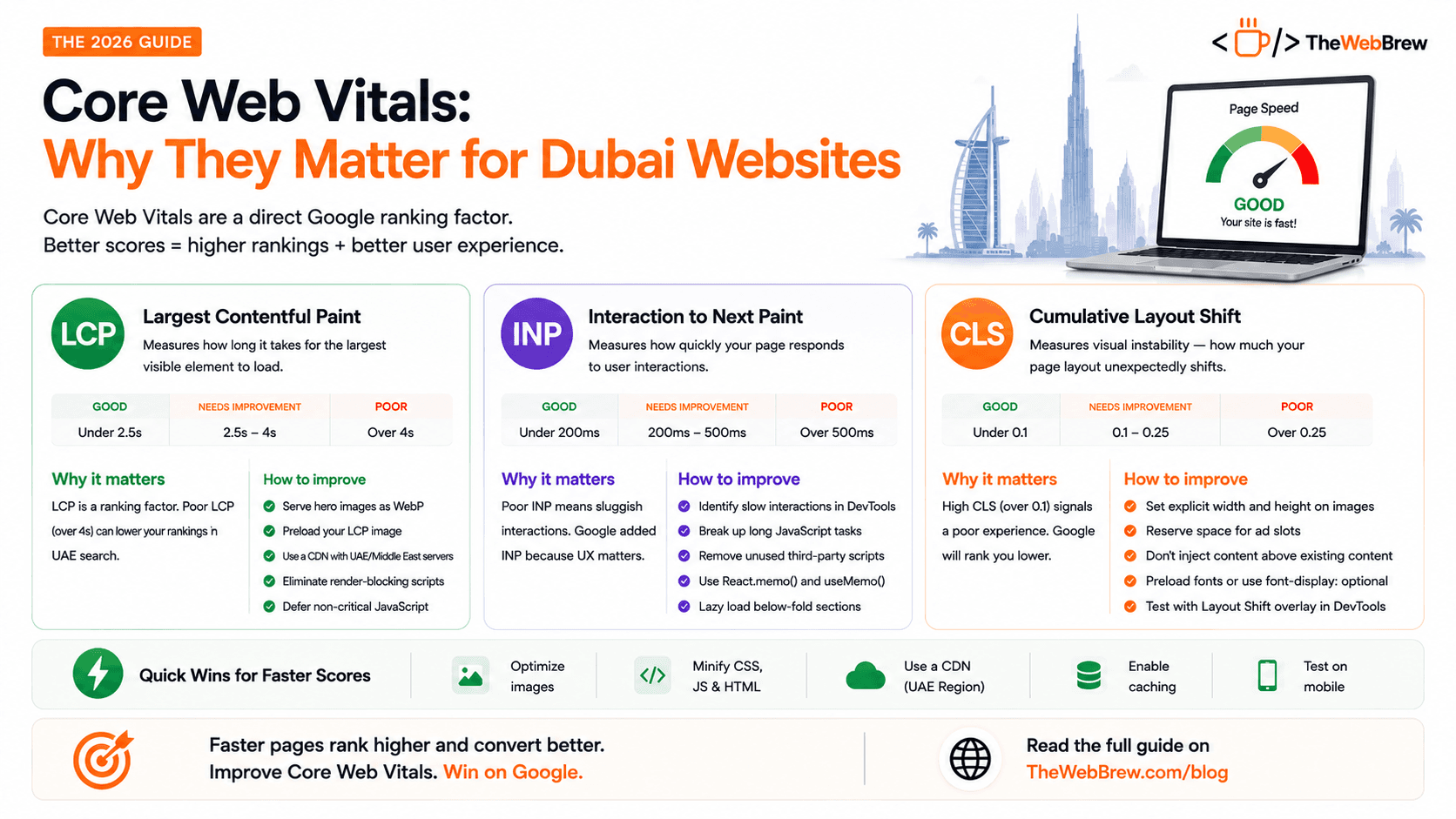
The 3 Core Web Vitals explained
Largest Contentful Paint
LCP measures how long it takes for the largest visible element on your page (usually a hero image or heading) to fully render. It's essentially a user's first impression of whether your page is loading.
LCP is one of the three Core Web Vitals Google uses in its ranking algorithm. A poor LCP (over 4s) can directly suppress your rankings in UAE search results.
Interaction to Next Paint
INP replaced FID in 2024 and measures how quickly your page responds to user interactions taps, clicks, and key presses. A high INP means your page feels sluggish to interact with.
Poor INP is a common problem on WordPress sites with heavy plugins or React apps with unoptimised client-side rendering. Google added INP to Core Web Vitals because slow interactions destroy user experience.
Cumulative Layout Shift
CLS measures visual instability how much your page layout unexpectedly shifts as it loads. The classic example: you're about to click a button and an image loads above it, moving the button down. You click the wrong thing.
Layout shifts are one of the most frustrating user experiences. A CLS score above 0.1 signals to Google that your page provides a poor experience and it will rank accordingly.
How to check your Core Web Vitals
PageSpeed Insights (pagespeed.web.dev) free, instant. Enter your URL and Google will show your actual Core Web Vitals scores measured from real users (field data) plus a lab simulation. This is the most important tool.
Google Search Console your Core Web Vitals report under Experience shows which pages are failing, needs improvement, or passing across your entire site. Filter by mobile vs desktop.
Chrome DevTools Lighthouse run an audit locally to identify specific issues with recommendations. Most useful for debugging specific fixes during development.
Frequently asked questions
How much do Core Web Vitals actually affect Google rankings for UAE websites?
Core Web Vitals are a confirmed part of Google's page experience ranking signals, meaning they directly influence rankings alongside content relevance and backlinks, though they are not the single biggest ranking factor. In practice, this means two UAE websites with similarly strong content can rank differently purely because one loads and responds noticeably faster than the other, and a website with genuinely poor scores, LCP over 4 seconds or CLS over 0.25, can be actively suppressed in search results regardless of how good its content is. The effect compounds with user behaviour: 53% of visitors abandon a page that takes over 3 seconds to load, so poor Core Web Vitals cost both direct rankings and the conversions that would have come from visitors who never waited around to see the content. For UAE websites, where roughly 78% of traffic is mobile on variable network speeds, Core Web Vitals performance matters even more than the global average suggests.
Why is my Dubai website's INP score poor even though it loads fast?
INP measures how quickly your page responds to user interactions like taps and clicks, which is a completely separate problem from initial load speed measured by LCP. A page can load its visual content quickly, giving a good LCP score, while still feeling sluggish to interact with if it has heavy JavaScript running on the main thread, common on WordPress sites loaded with plugins or React applications with unoptimised client-side rendering. To diagnose this, open Chrome DevTools Performance panel and identify which specific interactions trigger long tasks. The most common fixes are breaking up long JavaScript tasks with setTimeout or scheduler.yield(), removing unused third-party scripts such as extra chat widgets, tag managers, or tracking pixels that many UAE websites accumulate over time without auditing, and using React.memo() and useMemo() to prevent unnecessary re-renders on expensive components. INP was added to Core Web Vitals specifically because a fast-loading but unresponsive page creates real user frustration that older metrics like FID didn't fully capture.
What's the fastest way to check and fix Core Web Vitals for a UAE website?
Start with PageSpeed Insights at pagespeed.web.dev, it's free, instant, and shows your actual Core Web Vitals scores from real users, called field data, alongside a lab simulation that pinpoints specific issues. For a site-wide view across every page rather than one URL at a time, use the Core Web Vitals report in Google Search Console under the Experience section, which groups pages into failing, needs improvement, and passing categories and lets you filter by mobile versus desktop. The fastest wins for most UAE websites are usually serving hero images as WebP instead of JPEG, which cuts file size by 30-50%, using a CDN with Middle East edge servers such as Cloudflare or Vercel to reduce latency for UAE visitors specifically, and setting explicit width and height on every image to prevent layout shift. Fixing these three items alone typically resolves the majority of Core Web Vitals failures without needing a full rebuild of the site.
Related reading
Fix your Core Web Vitals
Our team audits your UAE website, identifies every failing Core Web Vital, and implements the fixes with a post-fix PageSpeed score to prove the improvement.
Get a Speed Audit